Windows desktop · futures

A futures terminal
that shows its work.

Order-flow charting, a click-to-trade ladder, copy trade across your funded accounts, and machine-learning signals that carry the verdict from data the model never saw.
Get beta access See pricing $25/month · one plan · everything included
Built on Rithmic Bring your own credentials No data resale Native C++ · Qt
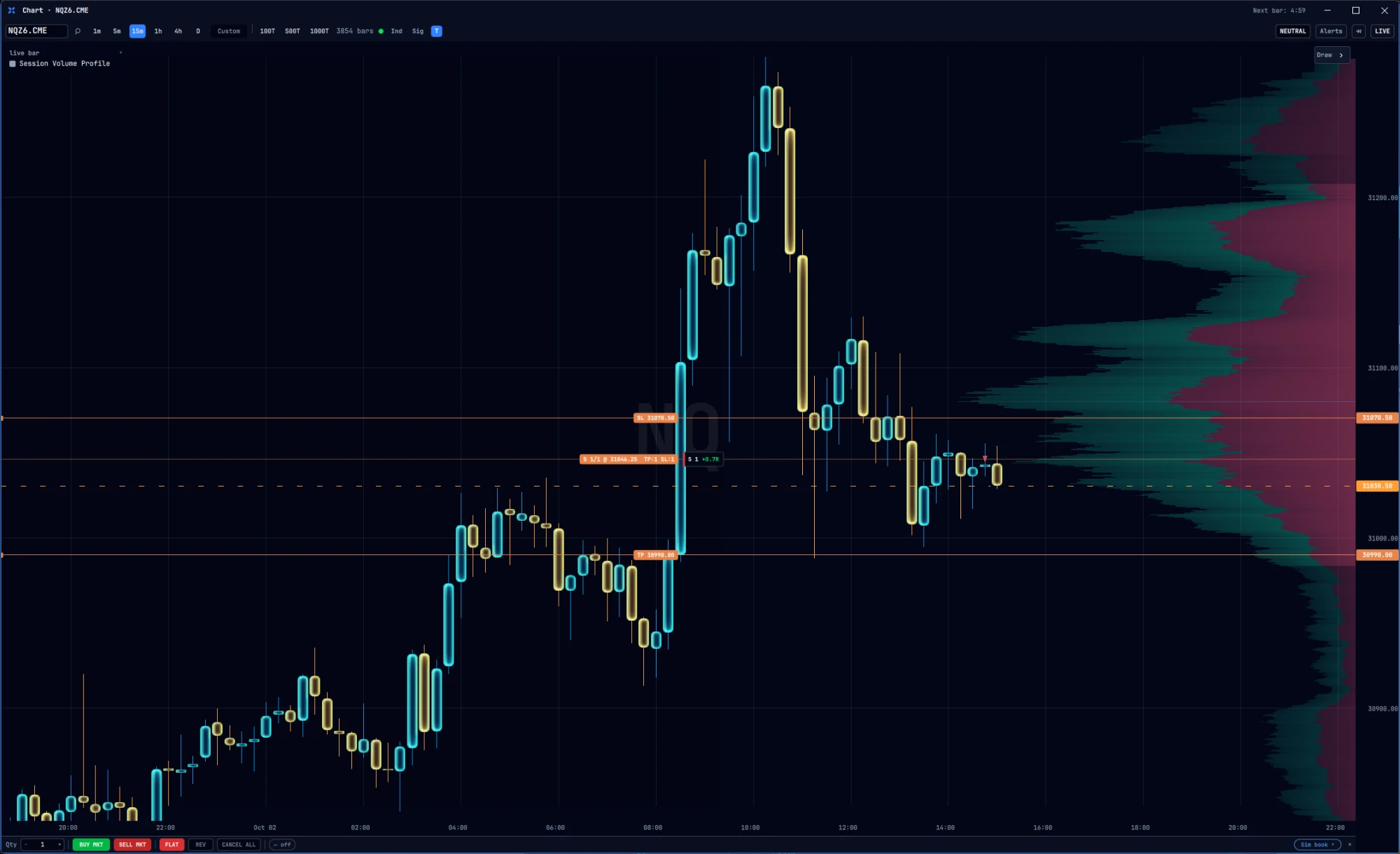
Tidemark Terminal chart of NQ December futures on 15-minute candles: a sharp rally at the open, a reversal, and a short position with its stop and target bracketed around price, beside a session volume profile.
NQZ6, 15-minute. Live market data, simulated account.
See it run

Two minutes, one trade, start to finish.

Entry off the ladder, the model's verdict alongside it, and the journal entry that writes itself when the position closes.

Recorded on a live session, 6 October 2026. No narration. The hold is sped up and labelled on screen; the fills are untouched.

Want the long version?

The full walkthrough covers setup, connecting your broker, building an indicator in the blueprint editor, and reading a holdout verdict.

Watch the walkthrough
Six surfaces

One window, the whole trade.

Entry, context, review and the model's opinion live in the same application, so you are not alt-tabbing between a chart, a copier and a spreadsheet while the trade is on.

Chart

Order-flow charting down to the tick your broker reports, with the session levels and context you actually trade off.

Heatmap

Resting liquidity over time, so you can see where the book is thick, where it thins out, and where it vanished.

API indicator screen

Write indicators against a documented API, or wire them together visually in the blueprint editor. Your logic, running in the platform.

Copy trade

Mirror fills from a lead account across your other accounts, with sizing set per account. Built in, not bolted on.

Journal

Every trade recorded automatically with excursion data and the market context you had at entry, so review is evidence rather than memory.

ML signal

Models trained on your instrument, with the holdout verdict attached to the signal so you can see whether it survived data it never saw.
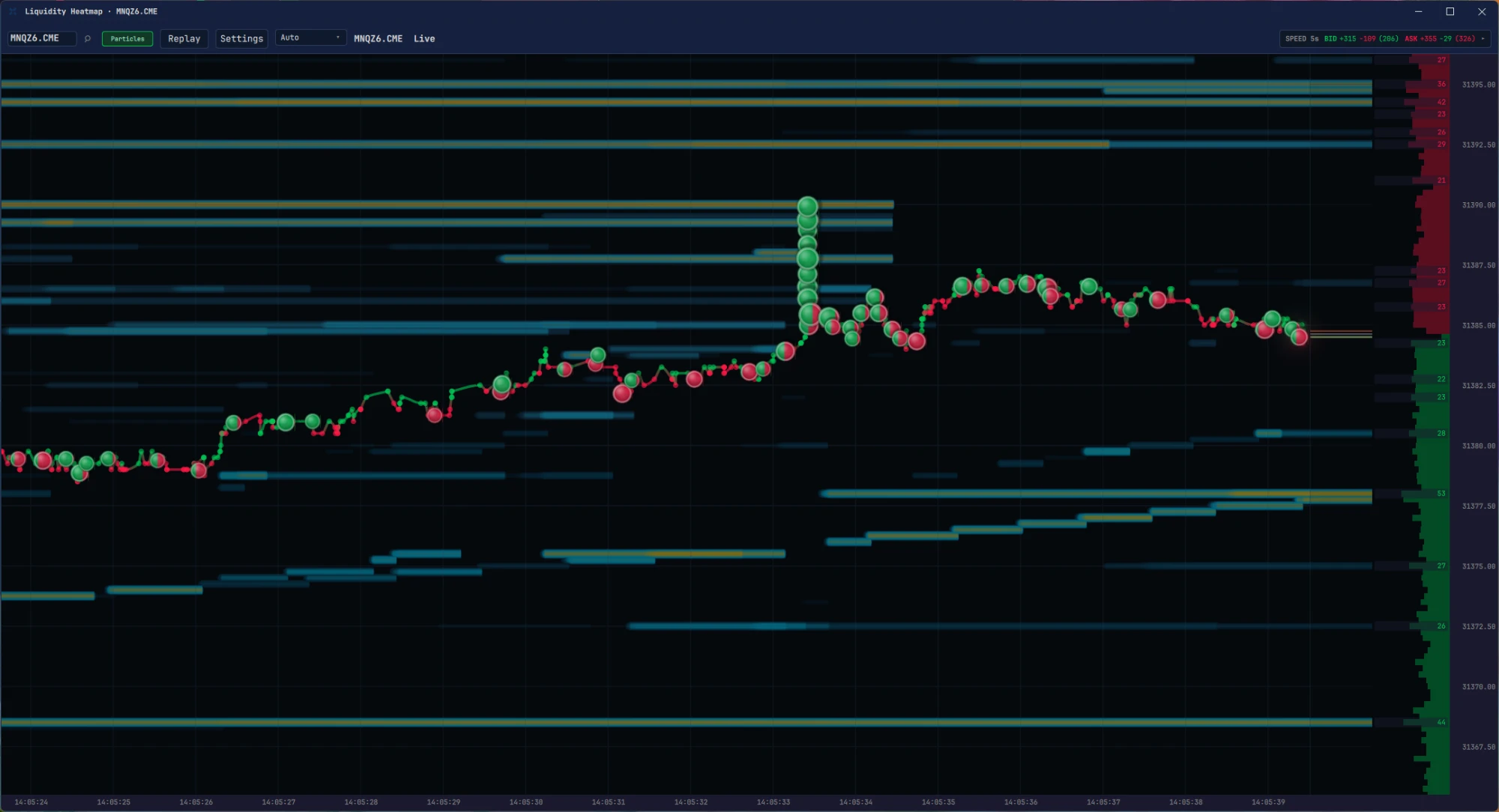
Tidemark Terminal liquidity heatmap for MNQ December futures over fifteen seconds: horizontal bands of resting orders fading as they thin, the traded price threading between them as green and red prints, a stack of large buys at 31390 running into a resting band, and the live book stacked down the right edge.
Liquidity Heatmap. MNQZ6, fifteen seconds of the book at 5-second speed. Bands are resting orders, dots are prints, bigger dots are bigger prints.
Honest validation

Most platforms show you a backtest. This one shows you what survived.

A strategy that looks perfect on the data it was fitted to tells you nothing. Tidemark keeps the uncomfortable numbers in front of you.

Holdout verdict
Every model result is reported on data the model never saw during training, and that verdict travels with the signal.
Exit-aware simulation
Results are simulated with the brackets you would actually place, not with idealized fills at the perfect price.
Per-instrument costs
Commissions, exchange fees and slippage are modeled per contract, so the edge you see is the edge after costs.
Coach

The session starts before the first order.

Every day opens with a check-in. How you are coming in, how much energy you have, what you intend to do. The coach keeps it beside your trades, so the review at the end of the day has the morning's honest answer to compare against.
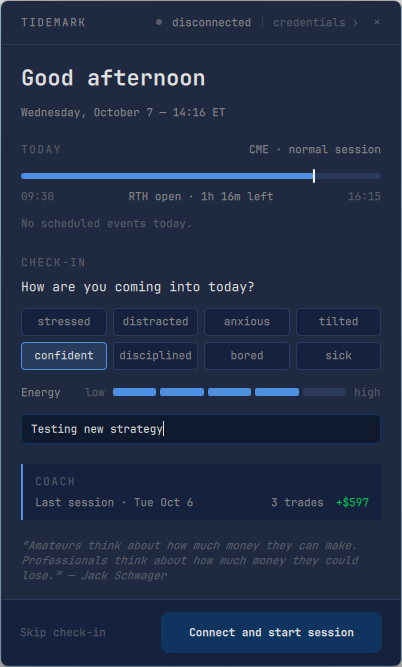
Tidemark Terminal start-of-day card: the CME session clock with time left in regular hours, a check-in asking how you are coming into today with stressed, distracted, anxious, tilted, confident, disciplined, bored and sick to choose from, an energy slider, a note reading Testing new strategy, the coach's summary of the last session, and a Connect and start session button.
Start-of-day card. Session clock, check-in, intent, and the coach's read of yesterday.
State before strategy
Eight one-word states and an energy level, chosen in two clicks. It takes ten seconds and it is the first thing the coach reads when a trade goes wrong.
Intent in writing
One line about what today is for. A trade that was never in the plan gets flagged against this line, not against a rule you forgot you set.
Yesterday, in one row
Trades and P&L from the last session, so the day starts with the number rather than the feeling about the number.
Session clock
Which exchange, which session, how long is left in regular hours, and any scheduled events, from the calendar the engine itself trades by.
Private beta

Get beta access

The beta build goes out in batches. Leave an email and I will send the installer and the setup notes when your batch opens.

No newsletter. One message when the build is ready, and one at launch.